A Semantic View is useful only if teams can keep its definitions current.
In Part 1, we defined the tables, relationships, dimensions, metrics, and rules that belong to an analytical domain. In Part 2, we followed a semantic query as the data engine turned those definitions into SQL that a team could inspect.
That leaves an operational question: how do teams create, retrieve, and maintain the definitions when more than one person or system depends on them?
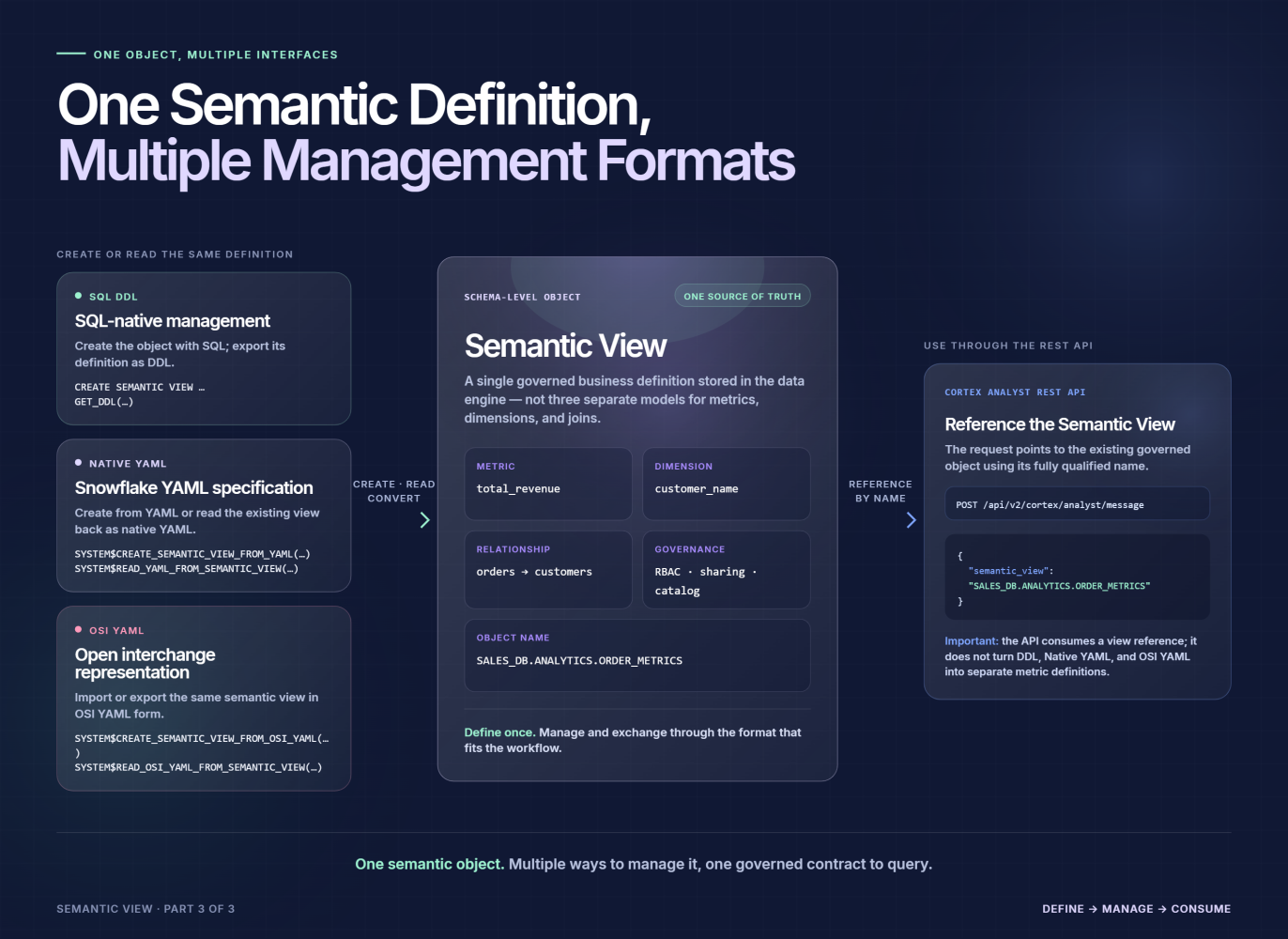
In MirrorShip Intelligence Platform (MIP), Semantic View definitions can be managed through SQL and REST APIs. The API supports both native YAML and OSI Core Metadata Specification YAML, giving teams ways to work with the same semantic objects beyond a hand-written DDL statement.
Keep the definition together
Consider the order-analysis domain from the earlier articles. Its Semantic View identifies an orders table, a customer table, the relationship between them, an order-date dimension, a customer-name dimension, and a revenue metric.
These elements need to stay together. Changing a metric expression without reviewing its description can leave an AI agent with outdated guidance. Changing a table relationship without checking the queries that use it can change the meaning of a result.
A Semantic View gives the team a single defined object to retrieve and review. The REST API can return a view definition as SQL DDL, native YAML, or OSI YAML; it can also return a summary containing its name, description, and AI-related guidance.
That does not make a definition correct by itself. It makes the definition accessible for the people and workflows responsible for keeping it correct.
Represent it in YAML
SQL DDL is one way to author a Semantic View. Native YAML provides another way to express its components in a structured, human-readable format.
The following abbreviated example shows how the order-analysis domain can be represented. It focuses on the elements needed for this article rather than reproducing every field from the earlier SQL definition:
name: ordermetrics
description: Order and customer revenue analysis

tables:
  - name: orders
    base_table:
      database: salesdb
      table: orders
    dimensions:
      - name: orderdate
        expr: o_orderdate
        description: Date the order was placed
    metrics:
      - name: totalprice
        expr: SUM(o_totalprice)
        description: Total monetary value of all orders
        synonyms:
          - revenue
          - sales

  - name: customer
    base_table:
      database: salesdb
      table: customer
    dimensions:
      - name: custname
        expr: c_name
        description: Full name of the customer

relationships:
  - name: ordtocust
    left_table: orders
    right_table: customer
    relationship_columns:
      - left_column: o_custkey
        right_column: c_custkey
The YAML expresses the same kinds of decisions as SQL DDL: which physical tables belong to the domain, which fields become dimensions or metrics, and how the tables relate. Descriptions and synonyms can remain alongside the elements they explain.
The format changes how the definition is supplied to the system. It does not move metric calculation or query execution out of the data engine: the YAML is converted into a Semantic View definition that the engine can use.
One Semantic Definition, Multiple Management Formats
Manage it through an API
A team can create a Semantic View by posting SQL DDL or YAML to the Semantic View REST endpoint. The request’s type parameter identifies the format: sql, sr for native YAML, or osi for OSI YAML.
The same API also provides operations to list views, retrieve an individual definition, check whether a view exists, and delete a view. For YAML creation, replace=true can be used when an existing definition needs to be replaced; without it, a duplicate name returns an error.
This matters for teams that manage analytical definitions as part of an engineering workflow. An application can retrieve the current definition rather than relying on a copied description. A review process can compare proposed changes to an existing model before submitting them.
The API makes those workflows possible; it does not perform the business review for the team. Someone still needs to approve changes to a revenue formula, relationship, or domain-wide filter.
Retrieve the SQL expansion
Definition management is only one side of the workflow. Teams also need to see what a semantic query becomes.
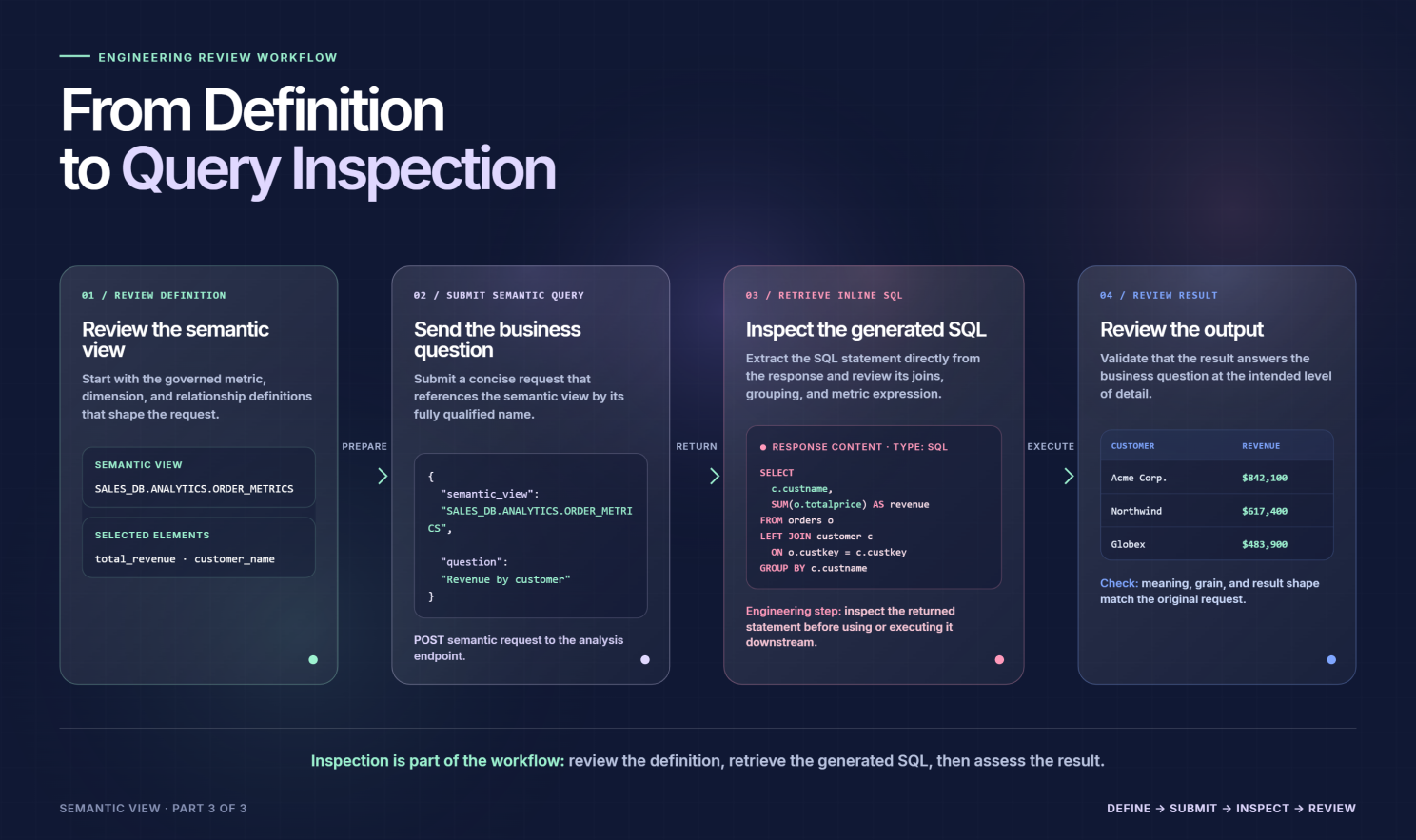
Part 2 introduced EXPLAIN INLINE as a way to inspect the SQL produced after Semantic View references are expanded. The REST API offers a corresponding inline endpoint: submit a query and receive both the original SQL and the expanded SQL.
Its response includes:
- originalSql: the query submitted by the caller
- inlineSql: the equivalent SQL after Semantic View references have been expanded
- referencesSemanticView: whether the submitted query referenced a Semantic View at all
This gives an application or review workflow access to the same boundary examined in Part 2: the point where selected semantic elements become SQL over underlying tables.
It is important to distinguish SQL inspection from runtime auditing. Returning expanded SQL helps a team review a query’s joins, calculations, and filters; it is not, by itself, a claim that the API records who ran a query, when they ran it, or what data they accessed.
Support an interchange format
The API can also create or return a Semantic View using OSI Core Metadata Specification YAML. This provides a defined format for representing elements such as datasets, fields, relationships, metrics, descriptions, and synonyms.
That is a concrete interoperability capability, but its scope matters. Supporting an OSI representation does not mean every construct in every external semantic model maps perfectly into MIP, or that integrations with particular third-party platforms have been validated.
Teams should check the fields and expressions relevant to their own models when importing or exporting a definition. The practical goal is to make semantic metadata easier to exchange—not to assume that a shared file format resolves every difference in calculation semantics or execution behavior.
From Definition to Query Inspection
Keep review in the workflow
A workable semantic-model lifecycle needs more than a place to store YAML.
When a definition changes, the team can review it at three points:
- Definition: Does the metric, relationship, description, or filter still match the agreed business meaning?
- Query: Does the consumer select the intended semantic elements for the question?
- Expansion: Does the resulting SQL use the expected tables, joins, expressions, and grouping?
MIP provides ways to retrieve the definition and inspect the expansion. Those capabilities make review more concrete, but they do not replace business approval, source-data validation, or access-control decisions.
This is the operational value of keeping semantics in the query path. A metric is not just a sentence in a document, and its execution is not hidden behind an unexplained answer. Teams can work with the definition as an object, query through it, and examine the SQL that follows.
Across this series, the path is now complete: define the business domain, query its semantic elements, inspect the SQL, and maintain the definition as the domain changes.