In Part 1, we described what must be defined in the data engine before a query is generated: the tables in a business domain, their relationships, the dimensions and metrics available to consumers, and the rules that must hold across queries.
Those definitions form a contract for how AI agents and other analytical consumers work with business operating data. They consolidate semantic information in advance, so a consumer can explore within defined boundaries rather than reconstructing joins and calculations from a physical schema.
This article follows that contract into the query path. In MirrorShip Intelligence Platform (MIP), a consumer can issue defined semantic elements, and the data engine lowers that query to executable SQL. The resulting SQL remains available for auditing.
Request semantic elements
Consider the order-analysis Semantic View from Part 1, salesdb.ordermetrics. It defines an order-total metric, customer and order-date dimensions, and a relationship between the orders and customer tables.
To request order value by customer, a consumer can select the metric and dimension directly:
SELECT *FROM SEMANTIC_VIEW( salesdb.ordermetrics METRICS orders.totalprice DIMENSIONS customer.custname ORDER BY customer.custname);
The request identifies what to analyze: a defined metric, a defined dimension, and a sorting rule. It does not restate the physical join key, the metric’s aggregate expression, or the grouping logic; those belong to the Semantic View definition.
An AI agent still has work to do. It must interpret the user’s request and select the appropriate elements. But it can make that selection from a defined semantic surface instead of inventing a relationship or calculation each time.
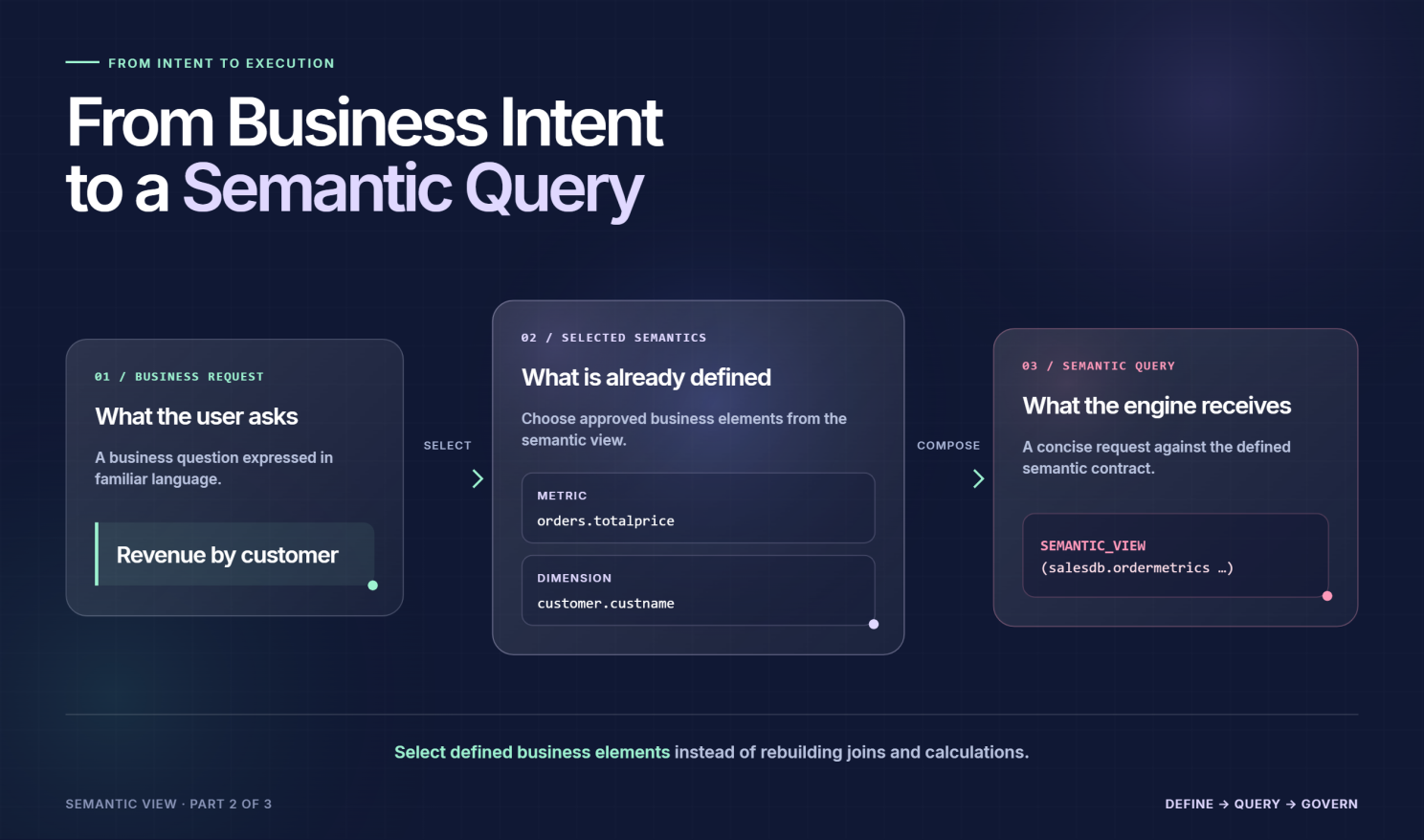
From Business Intent to a Semantic Query
Expand into SQL
The SEMANTIC_VIEW() reference is resolved in the data engine. The view is inlined as a derived subquery, using its declared relationship and the dimensions and metrics selected by the consumer.
For the request above, the underlying operations include an orders-to-customer join, an aggregation of o_totalprice, and grouping by customer. A simplified illustration looks like this:
SELECT customer.c_name AS custname, SUM(orders.o_totalprice) AS totalpriceFROM salesdb.orders AS ordersLEFT JOIN salesdb.customer AS customer ON orders.o_custkey = customer.c_custkeyGROUP BY customer.c_nameORDER BY custname;
This is an illustration of the underlying operations, not a verbatim EXPLAIN INLINE result. The exact expanded SQL depends on the Semantic View definition and should be inspected in the target environment.
The responsibilities are distinct: the consumer selects semantic elements; Semantic View supplies their definitions and relationship; the data engine assembles the physical query. That division reduces the amount of business logic a consumer has to infer at query time.
Make grain explicit
A request for a metric alone produces an aggregate result without a grouping dimension:
SELECT *FROM SEMANTIC_VIEW( salesdb.ordermetrics METRICS orders.totalprice);
Adding a dimension changes the requested grain:
SELECT *FROM SEMANTIC_VIEW( salesdb.ordermetrics METRICS orders.totalprice DIMENSIONS orders.orderdate);
In the second query, the order-date dimension determines how the metric is grouped. The consumer does not need to write a separate GROUP BY for this semantic-query form.
Grain matters because a query can reference the expected tables yet return a misleading result when it joins or groups them incorrectly. Semantic View makes the requested dimension, metric definition, and relationship visible together in the query path; it does not remove the need to model them correctly in the first place.
Apply filters at the right stage
A semantic query distinguishes conditions applied before aggregation from conditions applied to an aggregate result:
- WHERE filters dimension or fact values before aggregation.
- HAVING filters metric values after aggregation.
- A view-level FILTER, when defined, applies across queries against that Semantic View and is combined with a query’s own WHERE condition.
For example, a consumer can request only customers whose total order value exceeds a threshold:
SELECT *FROM SEMANTIC_VIEW( salesdb.ordermetrics METRICS orders.totalprice DIMENSIONS customer.custname HAVING orders.totalprice > 10000);
The threshold applies to the aggregated metric, so it belongs in HAVING. A mandatory domain rule—for example, limiting a view to qualifying transactions—belongs in the view-level FILTER when that rule should apply regardless of the individual query.
This separation keeps persistent business conditions distinct from the conditions introduced for a particular analysis.
Use a table-style interface
A consumer can also reference a Semantic View as a plain table. In this style, defined elements are exposed through flattened column aliases rather than named inside SEMANTIC_VIEW().
For the Part 1 model, a table-style query takes this form:
SELECT orders__orderdate, orders__totalpriceFROM salesdb.ordermetrics;
The interface changes, but the Semantic View definition does not. The data engine still expands the reference using the defined dimension, metric, and underlying tables.
These are two ways to query the same defined semantic surface, not two independent sets of metric definitions.
Inspect expanded SQL
A semantic interface is more useful when the physical execution path remains inspectable.
EXPLAIN INLINE prints the equivalent SQL after Semantic View references have been expanded into underlying table queries, including the relevant joins and aggregation. It supports both semantic-relation and plain-table query styles.
EXPLAIN INLINESELECT *FROM SEMANTIC_VIEW( salesdb.ordermetrics METRICS orders.totalprice DIMENSIONS orders.orderdate);
The expanded SQL lets a data team check which physical tables are referenced, how the metric is calculated, which dimensions establish the grouping grain, and which join and filters enter the query.
That inspection point matters when validating an AI-generated request. The team can begin with business-level elements, then examine the SQL that the data engine will execute rather than treating semantic expansion as a black box.
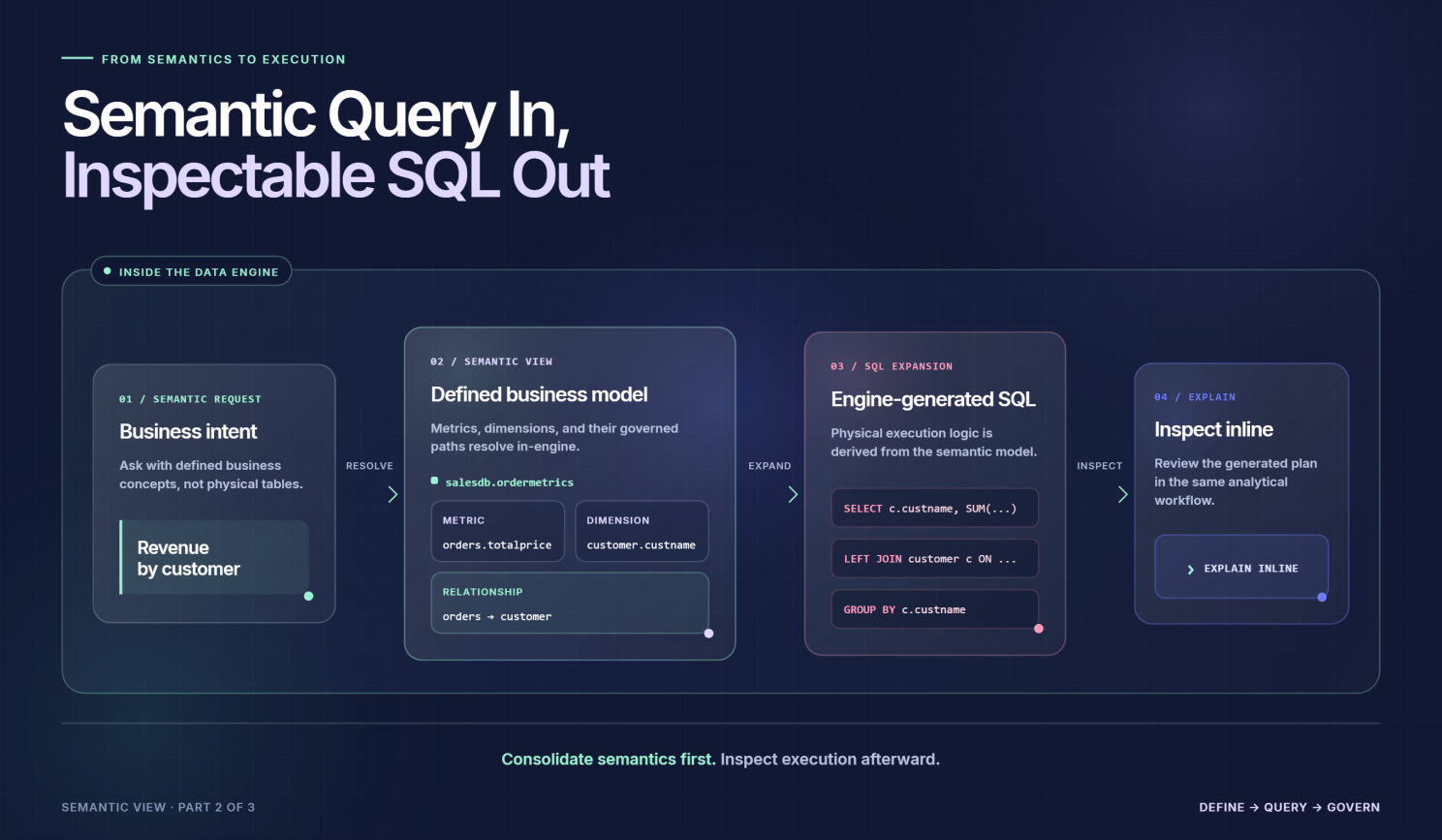
Semantic Query In, Inspectable SQL Out
Check join topology
Inspecting SQL answers one question: What query was assembled? A related question is whether the query’s joins preserve the intended row grain.
EXPLAIN SNOWFLAKE checks whether a query forms a single snowflake with one root, reachable related tables, and join edges supported by uniqueness evidence on the referenced side.
When the topology cannot form a snowflake, the statement reports an error. Where metadata cannot settle a condition—for example, whether time ranges overlap—it reports the assumption rather than silently treating it as proven.
This is a structural check, not a substitute for reviewing metric definitions or source-data quality. It helps teams identify join shapes that could inflate a result through fan-out, while leaving business correctness and data-quality validation to their respective processes.
Keep intent connected to execution
The workflow separates three responsibilities:
- The AI agent or analytical consumer interprets the request and selects relevant semantic elements.
- Semantic View provides the definitions, relationships, and domain rules established in advance.
- The data engine expands those elements into SQL that the team can inspect.
Part 1 focused on defining the contract. Part 2 shows how that contract enters the query path—from a request for metrics and dimensions to physical SQL that remains open to review.
In Part 3, we will turn to the lifecycle of those definitions: how teams can retrieve and exchange Semantic View metadata through YAML and APIs.
Next: Semantic View in MIP, Part 3: Managing Semantic Definitions with YAML and APIs